
One photo in, one bicep heart out
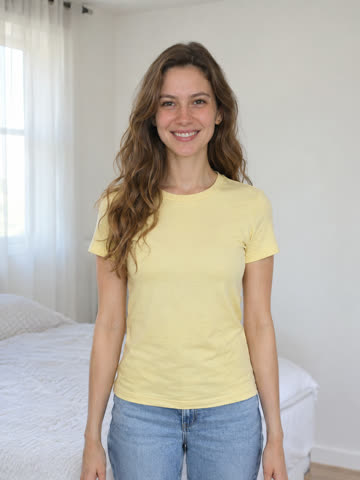
- Same flex, curl and hold
- Trend sound on by default
- About 7 s · 9:16 MP4
#bicepheart · One photo · An animated MP4, not a still
Bicep Heart Trend AI video generator: one photo, one bicep heart video
Upload one clear waist-up photo and Bicep Heart Trend AI animates the viral pose for you: one arm flexes with the fist beside your head, then your other hand curls high on that arm so the gap reads as a small heart. You get a vertical 9:16 MP4 video, not a still picture. A standard clip costs 6 credits, which the $5.99 Single pack covers, and a render that fails refunds its credits. It runs in your browser: no app, no CapCut, no prompt and no subscription.
The bicep heart in three beats
- Flex One arm bends up and the fist lands beside your head.
- Curl The other hand reaches across and curls high on that upper arm, just under the fist, thumb pointing down.
- Hold The gap between your fingers and the bicep reads as a heart. Hold it for two or three seconds.
This is a one-person, one-arm pose. It is not the heart people make with both arms over their head.
Add a clear waist-up photo
One sharp photo of one adult is all the generator takes. You do not have to be flexing in it; the pose is added for you. Accepted: JPG, PNG, WebP · max 10 MB · min 300 × 300 px.
- Camera photo, no drawings
- Both arms in view
- Just one person
- Nothing covering the face
Your price
- This clip
- Standard 480p · ~7 s · 9:16 · Trend sound
- Credits used
- 6 credits
- Pay today
- $5.99Single · 6 credits
Sign in comes first. Nothing is charged until you pick a pack.
One-time packs, no subscription. Failed or blocked renders give the credits back. See pricing
What is the Bicep Heart Trend?
The Bicep Heart Trend is a one-person pose that spread on TikTok in late October and early November 2026. You flex one arm with the fist beside your head, then curl the opposite hand high on that upper arm, just below the fist, with the thumb pointing down. The gap between your fingers and the bicep forms a small heart. It is a real pose anyone can film for free; Bicep Heart Trend AI makes the same moment as a video from a photo you already have.
How to make a bicep heart trend video with AI
Four steps in your phone or desktop browser. The full walkthrough is in our how-to guide.
Upload one photo
A front-facing, waist-up shot of one adult with both arms and hands in the frame. Arms relaxed is fine; the AI adds the flex.
Confirm consent and check the price
Tick that everyone shown agreed and is over 18, pick the quality, and read the credit total on the button before you start.
Let it render
The job runs in the background and is saved to My Creations, so you can close the tab and come back.
Check it, then post
Watch the whole clip: fingers, elbow and the heart gap. Add a sound you may use and label the post as AI-generated.
A bicep heart video maker that tells you what you get
The things people ask about most, answered before you pay.
A video, not a still preview
You get an animated MP4 of the whole flex and curl. Some tools give a free still of the final pose; that is a picture, not a video.
The price before you render
The button shows the exact credits for your settings. A standard clip is 6 credits, and the $5.99 Single pack covers it.
One photo, no prompt
The pose is built in. You do not upload a second photo, a reference video or a written prompt.
In the browser, no app
It works on iPhone, Android and desktop. There is no app to install and no CapCut template to hunt for.
Failed renders cost nothing
If the model errors or the safety screen blocks a photo, the credits go back to your balance on their own.
Trend sound on, or a silent cut
The clip keeps the original trend sound unless you pick Silent. We do not license that sound, so brand accounts should go silent and add licensed audio.
The photo decides how clean the heart looks
Four checks before you upload. The photo guide has good and bad examples for each one.
Waist up, both arms in frame
Shoulders, elbows, wrists and hands all visible, with room above your head for the raised fist.
Short sleeves or bare arms
Loose sleeves and bulky jackets hide the arm line and can smear as the arm moves.
One adult who said yes
Yourself, or an adult who agreed. No minors, celebrities or public figures.
Even light, face visible
Daylight or a bright room, no sunglasses or heavy filters, facing the camera.
Learn the pose, check your photo, make the video
Short guides that answer the questions people ask before making a bicep heart video.
Bicep Heart Trend AI FAQ
Uploads, the download, privacy, sound, credits and refunds.
What the Bicep Heart Trend is
The one-arm pose, look-alikes, small arms, origin and sound.
How to make a bicep heart AI video
Five steps, four methods compared, and what to check before posting.
Bicep heart photo guide
Good and bad photos, sleeves, framing and consent.
Can ChatGPT make a bicep heart video?
What a chat assistant can and cannot do for this trend.
Best bicep heart AI apps compared
Ten tools side by side: output, listed price, pets and catches.
Film the bicep heart for free
Film it in four takes, and what free AI offers really include.
Bicep heart sound and song
Which sound the clips use and how to add it in TikTok.
Bicep heart CapCut template or filter
What templates and effects can do, and what they cannot.
Bicep heart AI video not working?
Fixes for merged fingers, a missing heart and a drifting face.
One-time credit packs for bicep heart videos
Bicep heart video pricing: only pay for clips you render
Pay once, no subscription. Each 480p bicep heart render uses 6 credits, so the $5.99 Single covers a first clip; 720p uses 15.
One-time credit packs
No subscription. Credits from a pack sit in your balance until you spend them.
Single
6 credits · ≈ 1 clip
≈ $5.99 / clip
One 480p clip
- Bicep heart clips from a single photo
- 9:16 MP4 downloads without a watermark
- Failed renders refund their credits
- Pack credits have no expiry date
- One charge, nothing renews
Trio Pack
Save 28%18 credits · ≈ 3 clips
≈ $4.33 / clip
Three 480p clips, or one 720p
- Bicep heart clips from a single photo
- 9:16 MP4 downloads without a watermark
- Failed renders refund their credits
- Pack credits have no expiry date
- One charge, nothing renews
Five Pack
Save 33%30 credits · ≈ 5 clips
≈ $4.00 / clip
Five 480p clips, or two 720p
- Bicep heart clips from a single photo
- 9:16 MP4 downloads without a watermark
- Failed renders refund their credits
- Pack credits have no expiry date
- One charge, nothing renews
Secure checkout · Each pack is charged once, never renews and its credits never expire
Credits per clip
Each render turns one photo into a short vertical bicep heart video. The exact credit total is on the button before you generate, and a failed render gives the credits back.
| Clip and quality | 480p | 720p |
|---|---|---|
| Bicep heart video · vertical 9:16 MP4 | 6 credits | 15 credits |
Bicep Heart Trend AI FAQ
Short answers about the pose, your photo, the video, the sound and the cost.
Your photo is one tap from a bicep heart
Upload one clear photo, check the price on the button, and get your Bicep Heart Trend video as a vertical MP4.